

New Access 2007 Database and Table Design Features

As a database designer in Access for over ten years now, some of the database design features in Access 2007 provide some intriguing enhancements. Some of these are designed to provide more flexibility and options and others are designed to provide greater ease of use. Overall Access 2007 is quite an improvement over the prior versions.
One of the fine new features is the availability of showing tabbed objects in the application window. In Access options you can choose whether or not to display object tabs across the top of the Access desktop or have them float in windows as in prior versions. The tabs make choosing an open object quite handy, but be aware that in this mode, all windows are “maximized” and cannot be restored to a different size.
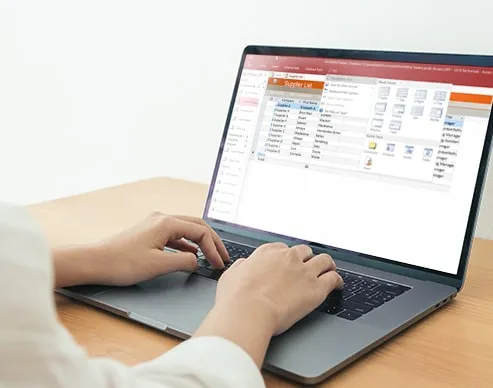
A couple of nice features relate to table design. Complete database templates have been improved and are still available as before. The table design wizard of old is gone, which was useful to quickly design new tables. Instead, there are five new table templates available (Contacts, Tasks, Issues, Events, and Assets), which have all of the fields typical of each subject matter already designed-in, including the appropriate field properties. What is new and more convenient than the ‘old’ table design wizard is the new field template which can be accessed while in table datasheet view. Once it is selected, a list of pre-designed fields appears on the right of the screen. These can then be dragged into the datasheet and added anywhere you like. Datasheet view has been improved too; you can now perform basic aggregate functions (sum, average, count, min, max, etc.) on columns and the rows can now be displayed with an easily-changed alternating color of your choice.
Finally, there are some in field data-types. The memo data-type can now accept rich-text formats, such as changing fonts, colors, and making text bold or italic. An especially useful attribute added to the memo data type is the ability to enable tracking of entries. When this is enabled, only the last entry is visible (up to 65,536 characters), but all previous entries are available for review in column history, along with a date and time stamp for each update to the memo field. Another improvement is the new attachment data type, which compresses and embeds attached file(s) into any record in the table. You can attach more than one file to the record, and an indicator on the field lets you know how many attachments are included. And last, a new feature added to lookup fields is the ability to choose more than one entry on the drop-down list, which then adds your choices to the field, separated by commas.

George Kuck - Microsoft Access training instructor


Access Training @ Training Connection

Microsoft Access classes Los Angeles & Chicago cover 2003, 2007 and Access VBA.

Other Microsoft office classes:

Microsoft Excel class - Chicago and Los Angeles

Project training Los Angeles

PowerPoint classes Los Angeles

Microsoft Word Training

Microsoft Project 2007 Testimonial
"Pat was great! He didn't simply go over the software the entire time, rather he applied real world project management philosophies and PMI standards to the lessons which kept the class completely interested. Also the staff, Allyncia was probably one of the most pleasant and nice and helpful people I have ever encountered. No joke. She is a keeper on staff! I will definitely think of Training Connection FIRST for my future training needs and desires. Thanks to Pat and the team!"
Peter Becker - Liquidus TV
HTML and CSS Fundamentals Testimonial
"Every aspect of my experience with Training Connection is impressive. The website, the customized phone registration, the facilities, the receptionist, the instructor, the curriculum were impeccably professional. I can't wait to take more courses!"
Zoe Korstvedt - Bungalow
# # # # # # # # # # # # # # # # # #
Computer and Business Skills Training

Adobe Training

Acrobat Training
After Effects Training
Captivate Training
Dreamweaver Training
Flash Training
Flash Builder Training
Illustrator Training
InDesign Training
Photoshop Training
Premiere Pro Training

Web Development

AJAX Training
CSS Training
HTML Training
JavaScript Training
jQuery Training
PHP MySQL Training
WordPress Training

Microsoft Office

Access Training
Excel Training
Outlook Training
PowerPoint Training
Project Training
Visio Training
Word Training

Business Skills

Business Communication
Business Etiquette Training
Business Writing Class
Customer Service Training
Project Management Training
Time Management Training

QuickBooks

QuickBooks Training
 
 
  • HOME
  • TRAINING
  • TIMETABLE
  • ONSITE TRAINING
  • ROOM HIRE
  • ABOUT US
  • CONTACT US

  • SITE MAP
  • TERMS
  • COPYRIGHT 2007 - 2009